
This article explains how to connect Bp Premier to Cubiko and launch Cubiko Patient View from the patient record in Bp Premier Oxford SP3 or later.
Patient View brings key patient information together in one place, helping you quickly see what matters during a patient's visit. View alerts, program registrations, possible service opportunities, clinical insights, administrative items and a timeline of their recent and upcoming care. With direct access from the patient record, you can open Patient View, review the information and return to your work in Bp Premier.
For more information about Patient View, visit the Cubiko Knowledge Base.
Before you begin
To connect Bp Premier with Cubiko Patient View:
- An active Cubiko account is required to access Cubiko features, including Patient View. For more information, visit the Cubiko website.
- Ensure Bp Premier version Oxford Service Pack 3 or later is installed on the server and all workstations.
- Approve Cubiko as a third-party integration in Setup > Configuration > Database > Setup third-party integrations. See Setup third-party integrations for more information.
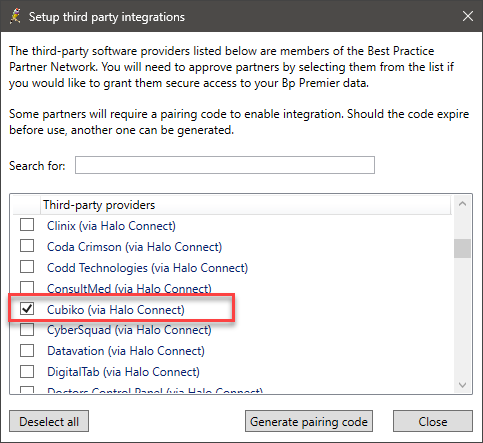
NOTE If Cubiko has not been approved in Setup > Configuration > Database > Setup third-party integrations, the Cubiko website will launch in an external browser window instead of Patient View.
Launch Cubiko Patient View
To launch Cubiko Patient View from the patient record:
- Open the patient's record in Bp Premier.
- Click Cubiko Patient View. The button is located above the Notifications panel, next to Fact Sheets.
- Patient View will launch in an external browser window for the selected patient. Review the patient's alerts, program registrations, service opportunities, clinical insights, administrative items and care timeline. For more information about using Patient View, visit the Cubiko Knowledge Base.
- Close the browser window to return to the patient record in Bp Premier.
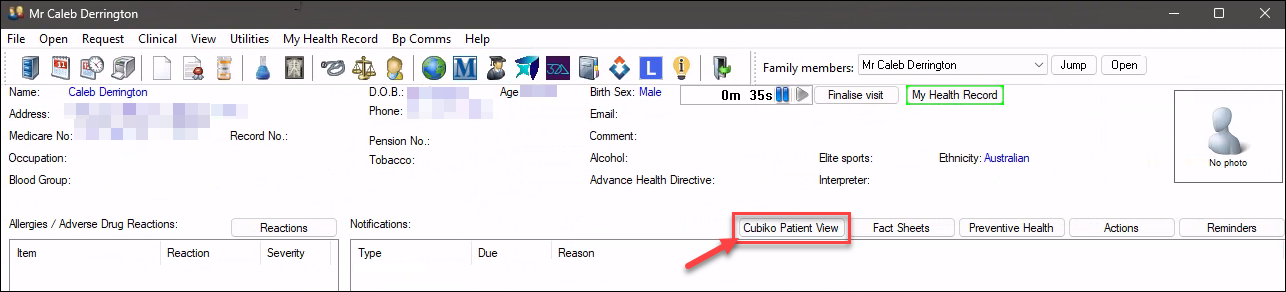
NOTE When Patient View is launched, Bp Premier passes the practice, patient, appointment and user details to Cubiko so the selected patient's information will display.
Last updated: 11 November 2026.



 AU
