
The Medicare Assignment of Benefit (AoB) process is undergoing a major digital transformation from 01 July 2026 - 30 June 2027. These updates are supported by legislative changes and the need for more secure and efficient healthcare billing.
The changes were initially set to be introduced from the 1st of July 2026. On the 18th of June a revised transition timeline was announced, including:
- Flexibility for verbal consent to be available in all settings until 30 June 2027,
- Enduring assignment of benefit for all MyMedicare registered patients, residents of aged care facilities and patients attending Aboriginal Community Controlled Health Organisations (ACCHOs),
- And a 12-month transition period, to reduce the administrative burden on both GP practices and patients while ensuring the integrity of Medicare is maintained.
TIP See the Australian Government Department of Health, Disability and Ageing (DoHDA) website for their official Frequently Asked Questions document. This document will continue to be updated with information as it becomes available.
In this article:
Assignment of Benefit Overview
Assignment of Benefit (AoB) refers to the process by which a patient authorises Medicare to pay their benefit directly to the healthcare provider, rather than reimbursing the patient. This arrangement streamlines payments to providers and reduces administrative effort for both patients and practices.
Some of the key changes being introduced include:
- Electronic Forms: Providers will be able to generate and send electronic forms via SMS to patients to assign their benefits through web forms on their own devices.
- Pre and Post-Assignment Flexibility: New digital options will allow benefits to be assigned when booking a service (pre-assignment) or after a service has occurred (post-assignment), rather than strictly during the attendance.
- Basic Service Description: For episodic pre-assignment agreements, a 'basic service description' will be the minimum required information. Approximately 4,600 MBS items have been mapped into 28 categories (e.g., GP – Standard, Specialist – Procedure) to provide patients with meaningful information while maintaining flexibility for providers.
- Record Retention: Providers will be required to retain a copy of the completed/signed agreement for 2 years.
Paper-based workflows can be slow, prone to errors, and difficult to manage, especially as telehealth and digital health services become more common. Legal compliance is also complicated by evolving requirements for consent, particularly with the rise of electronic and verbal agreements. Audits revealed shortcomings in consent procedures and record-keeping, especially when verbal consent was obtained during telehealth sessions.
These limitations highlight the need more integrated digital solutions, clearer legal standards, and processes that better support both providers and patients in a rapidly changing healthcare environment.
No. DVA does not use Medicare's Assignment of Benefit process. It has its own separate claiming system with its own item numbers, payment rules, and consent requirements.
For more information about DVA provider claiming, visit the Department of Veterans’ Affairs website.
Providers will be required to retain the completed/signed agreement for 2 years for each Assignment of Benefit consent request. This retention period is essential for meeting audit and compliance requirements from 30 June 2027 onwards.
To prepare for Assignment of Benefit changes in your practice:
- Decide how you’re going to implement this in your practice.
- Review your policies and processes, e.g. for end of day billing “sign off” before batching.
- Start using a paper process now so your patients get used to assigning their benefit for bulk billing.
- Check that you have your SMS ID registered with ACMA.
- Make sure your third party products are ready and utilise your comms channels and online booking notices.
- Review the Bp Premier system requirements.
- Educate your clinicians and make sure your patients are ready.
- Update Bp Premier when the program update and Data Updates are available.
Assignment of Benefit Concepts
- Pre-Service Assignments, also known as a Pre-Assignment, allows you to collect a patient’s consent form before their consultation. This can be done through methods such as bulk SMS messages to be sent out of Bp Premier for future appointments. It can also be manually triggered from the Appointment book. SeeSee Collect a Pre-Assignment of Benefit Form for more information. for more information.
- An Assignment of Benefit form can still be collected after the consult has occurred during your usual workflow for billing. This is now referred to as a Post-service assignment or Post-assignment. See See Collect a Post-Assignment of Benefit Form for more information. for more information.
- Verbal agreements can be collected when all other options are unavailable until 30 June 2027. See How do I record verbal consent? for more information.
- Enduring assignment of benefit can be collected for MyMedicare registered patients, residents of aged care facilities and patients attending Aboriginal Community Controlled Health Organisations (ACCHOs). In Bp Premier, enduring assignment of benefit is set in the Patient details. See Do not generate an Assignment of Benefit form for more information.
To facilitate a pre-service assignment, a Basic Service Description has been introduced to provide patients with meaningful information about what they are consenting to, while still maintaining flexibility for billing providers.
This system groups 4,600+ MBS items into 28 Basic Service Description groups, such as ‘GP - Care Plans’, ‘GP – Standard’, or ‘Allied Health'.
In Bp Premier Oxford, you can link a Basic Service Description to each of your appointment types, which can then be used when generating forms to represent the group of MBS items that they consent to assign their benefit for.
If the service actually rendered falls within that Basic Service Description group, the assignment is valid. However, if the rendered service falls outside of that Basic Service Description group, a new post-service Assignment of Benefit must be captured for those MBS items billed.
No, if the basic service description for the approved form is different to the service provided, for example, a GP Standard type appointment was booked but turned into a GP Long consult or care plan review, a new AOB form must be generated and completed.
For pre-assignment agreements, a new concept called the Basic Service Description has been introduced to provide patients with meaningful information while allowing providers clinical flexibility. This system maps approximately 4,600 Medicare Benefits Schedule items into 28 broad categories, including standard GP attendances, care plans, and specialist procedures.
In Bp Premier Oxford, it is used when generating a pre-assignment of benefit form and when bulk sending pre-Assignment of Benefit SMS requests. Basic service descriptions are configured to appointments types used for bulk billed appointments.
Basic Service Description categories in Bp Premier include:
- Aboriginal Health Worker or Aboriginal Health Practitioner – Long
- Allied Health
- GP – Care Planning and Health Assessments
- GP – Long
- GP – Other
- GP – Short
- GP – Standard
- Midwife – Long
- Midwife – Other
- Midwife – Short
- Midwife – Standard
- Nurse Practitioner – Long
- Nurse Practitioner – Other
- Nurse Practitioner – Short
- Nurse Practitioner – Standard
- Practice Nurse or Aboriginal Health Practitioner – Care Planning and Health Assessments
- Practice Nurse or Aboriginal Health Practitioner – Other
- Practice Nurse or Aboriginal Health Practitioner – Standard
- Specialists – Care Planning and Health Assessments
- Specialists – Long
- Specialists – Other
- Specialists – Procedure
- Specialists – Short
- Specialists – Standard
- Optometry
- Practice Nurse or Aboriginal and Torres Strait Islander Health Practitioner/Worker
- Any Provider – Procedure
- Simple Pathology Services
During the 12-month transition period from 1 July 2026 to 30 June 2027, practices can record Verbal Assignment of Benefit for bulk billed services when patient agreement cannot be obtained physically or electronically.
To record Verbal Assignment of Benefit, the practice must:
- Explain to the patient how the patient signature field on the Assignment of Benefit agreement will be completed.
- Confirm that the patient agrees to assign their Medicare benefit.
- Enter ‘assignor verbally agreed’ in the assignor signature field.
- Send the completed form to the patient electronically.
- Keep a copy of the completed agreement for 2 years for record-keeping and compliance review purposes.
If the patient does not agree to assign their Medicare benefit, the practice can issue a private bill for the service.
Assignment of Benefit in Bp Premier
Yes, the Assignment of Benefit screens and workflows can be enabled in Bp Premier Oxford SP1.
Digital forms can be sent via SMS and paper forms can be printed before and after the consult. See Collect a Pre-Assignment of Benefit Form and Collect a Post-Assignment of Benefit Form for more information.
Requests can be managed through a new Follow up Assignment of Benefits screen available to users with Add/Edit/Delete permissions for Direct Billing. See Follow Up Assignment of Benefit for more information.
There will be instances where a new Assignment of Benefit must be collected before a rejected service can be re-included within a batch, and resent to Medicare for processing, such as when an item number is changed
The Medicare Online Claiming screen includes a workflow to identify when a new Assignment of Benefit must be collected from the patient to reprocess a claim, and to enable you to send this to the patient via a Bp Comms SMS, or to print a paper form ready for the patient’s signature.
See Generating a new Assignment of Benefit for a rejected claim for more information.
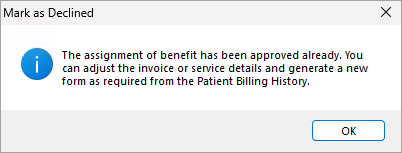
Once a printed form has been marked as approved the status cannot be changed. A new form can be generated by adjusting the invoice or service details from the Patient Billing History.
Digital Assignment of Benefit Requests
No, you do not have to collect an Assignment of Benefit via SMS.
An updated paper-based workflow will be available in Bp Premier alongside the new digital workflows for instances where you would prefer a patient to physically sign a paper form, or for patients who do not have access to an electronic device. Verbal agreements can be collected when all other options are unavailable until 30 June 2027.
Yes, digital AoB SMS messages are charged at the default rate of 4 cents ($0.04) per SMS. Reach out to our Bp Sales team to discuss options for a Bp Comms pack that suits your needs.
When editing templates, practices should monitor the character count for each template type, as longer messages may result in the use of multiple SMS credits when sending AoB requests.
If you use an external SMS messages service, set your Default Assignment of Benefit generation channel as Managed Externally. See Set up Assignment of Benefit for more information. for more information.
No, Comms Consent does not need to be recorded to send Assignment of Benefit forms via SMS. The Mobile Number recorded in the Patient Details will populate when sending AoB via SMS.
Bp Comms packs are purchased inclusive of GST. The individual AoB SMS request is sent exclusive of GST.
It is not mandatory for practices to have a registered Sender ID to send Assignment of Benefit requests via Bp Comms or through a third party messaging provider, but practices should strongly consider obtaining one.
If the practice does not have a Sender ID, messages will appear as "unverified" and will be grouped together in a single message thread on recipients' phones. This signals to recipients that the message might be a scam, which could significantly reduce the effectiveness of your patient communications and increase the risk of Assignment of Benefit request links being missed by patients.
See the Knowledge Base article Bp Comms Alpha Tag Changes 1 July 2026 for more information.
Assignment of Benefit and Third Party Providers
If your clinic uses Tyro your AoB workflows will be entirely external to Bp Premier. Appointment book status icons will not be updated and the status of requests will not be seen in the Follow up assignment of benefit screen. Claiming is done through Tyro so there will be no AoB processes in Bp Premier.
Use of Tyro Health EFTPOS machines to process bulk bill claims via Medicare Easyclaim is compliant with the updated AoB requirements.
TIP See the Tyro Health website for more information or the Bp Premier Assignment of Benefit workflows with Tyro Health webinar recording.
If you are using a third-party provider to generate and collect signed Assignment of Benefit requests, they do not need to be also generated in Bp Premier.
Reach out to your third-party provider to learn more about their processes for AoB. Each of our partners are working to update their own Assignment of Benefit solutions to include updated AoB form requirements and electronic alternatives for AoB.
Assignment of Benefit Oxford Masterclass Questions
NOTE To view the Bp Premier Oxford Masterclass webinar recording and questions not related to AoB see Bp Premier Oxford & AoB Masterclass Recording and FAQ.
Pre-Assignment of Benefit requests and SMS digital requests are both optional. It is not mandatory to use the pre-Assignment of Benefit forms or to send requests via SMS. The Send Assignment of Benefit form requests utility is not automated at this stage.
Reach out to your third-party provider to learn more about their processes for AoB. Each of our partners are working to update their own Assignment of Benefit solutions to include updated AoB form requirements and electronic alternatives for AoB.
In this update the forms can only be printed or sent via SMS. The ability to email an Assignment of Benefit form from Bp Premier will be introduced in a future update.
To email a form in an email client external to Bp Premier, select Printer when generating the form and use Print to PDF to generate a PDF of the form that can be attached in an email. The patient can print the form to sign and then scan and send back to the clinic.
There is no ability in Bp Premier.
- Printed forms do not need to be scanned into Bp Premier.
- To view an Approved AoB form sent via SMS with Bp Comms, go to the Follow up assignment of benefit screen, highlight the record, and click the View button.
- Speak with your third party provider if your Assignment of Benefit forms are Managed externally.
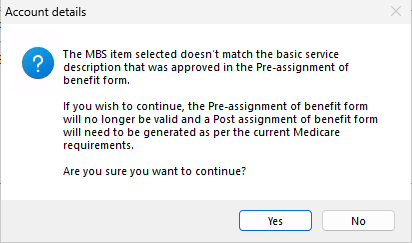
Yes, when finalising a visit or updating an invoice from the account details screen, Bp Premier will notify the user if the MBS items selected do not match the basic service description that was approved in the Pre-assignment of benefit form.
For authoritative guidance on the Medicare Assignment of Benefit process, including who can act as a responsible person and how to manage consent when a patient cannot sign, refer to the Services Australia website.
Evidence of authority to sign on the patient's behalf is not collected on the form, but could be requested in an audit.
- Multiple items can be covered in a single Pre-Assignment of Benefit form if they have the same Basic Service Description.
- In a Post Assignment of Benefit form, all items invoiced will be listed on a single form.
There is no limit to how many times an AoB SMS request form can be resent before it is approved. The link sent in the original message is valid for 30 days. Each time a message is resent Bp Comms credits are used.
No, the SMS message sent for an Assignment of Benefit form includes a link that must be opened in a web browser application (such as Safari or Chrome) to complete.
No, the Pre-assignment of benefit form is optional.
The Assignment of Benefit collection process is the same for nurses as it is for providers. There are different Basic Service Descriptions for nurses to use if collecting a Pre-assignment of benefit form. If provider and nursing items are being billed together on the same invoice, a post assignment of benefit form can be used.
Yes, you can use a pre-assignment of benefit for any item with a basic service description.
ECG items do not have a basic service description, a pre-assignment of benefit form cannot be created for ECG items. A pre-assignment of benefit form can only be created for a single basic service description.
Yes, you can use the Resend option from the Follow up assignment of benefit screen to resend an AoB request from Bp Premier by printing the form at any time, or resend by SMS for Bp Comms users. This includes forms Managed externally.
Standard appointment types will remain uneditable. A Basic Service Description can be added to appointment types for clinics that intend to use the bulk Send assignment of benefit form requests utility.
A single SMS message sent through Bp Comms for AoB will cost 4c unless the template used extends beyond the character limit for a single message.
If you are a mixed billing clinic, meaning that your clinic does a mix of both private and bulk billing, we recommend to create a custom appointment type for bulk billing if you intend to use the bulk Send assignment of benefit form requests utility.
An Assignment of Benefit form can only be generated from the Appointment book or from the Account details screen.
Only one basic service description can be added to the Pre-assignment of benefit form.
Yes, you can do a mix of all generation methods and form types.
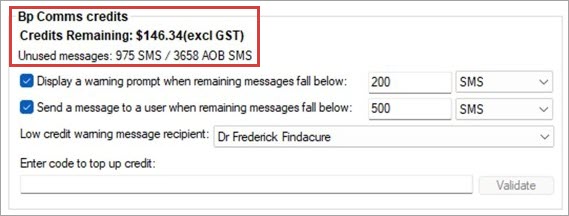
Practices intending to send digital AoB requests via SMS in Bp Premier must be registered for Bp Comms and have enough Bp Comms credits available. Digital AoB SMS messages are charged at the default rate of 4 cents ($0.04) per SMS. Reach out to our Bp Sales team to discuss options for a Bp Comms pack that suits your needs.
Appointment book AoB status icons are updated in two ways:
-
Automated background updates - Bp Service routinely checks for updates to outstanding AoB requests. This check occurs every 10 minutes by default.
-
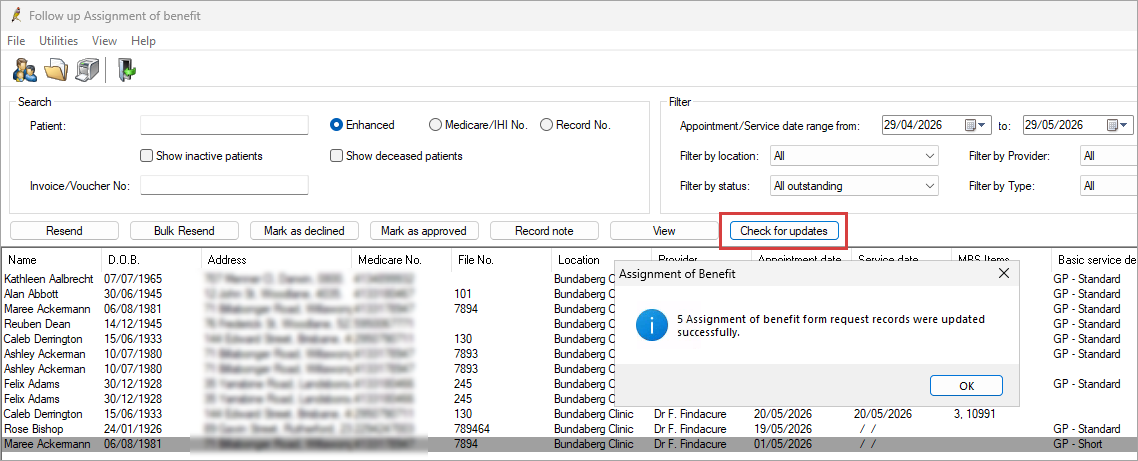
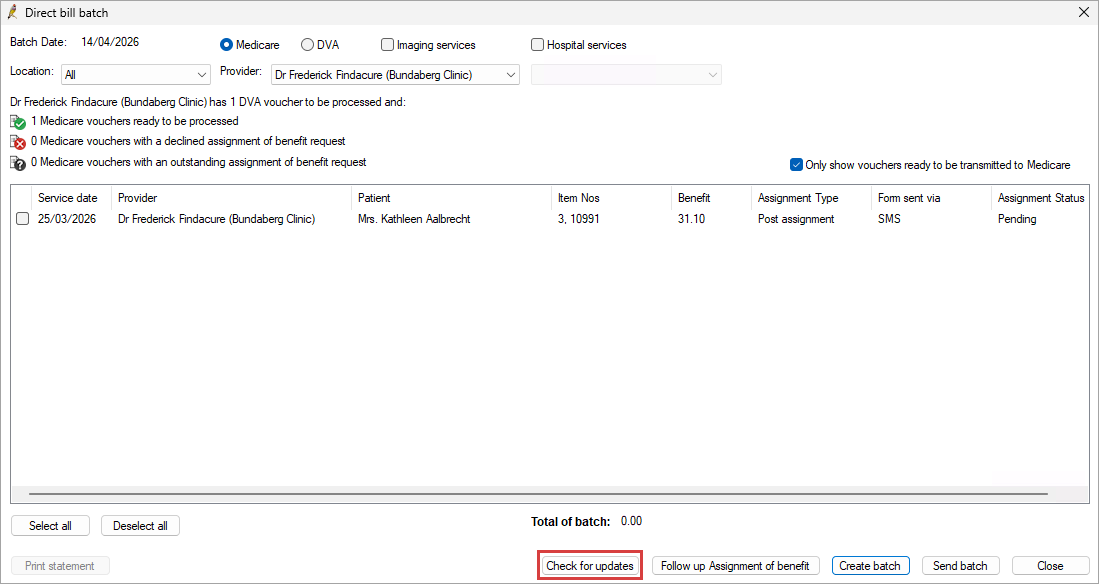
Manual 'Check for updates' actions - Users can retrieve the most recent statuses at any time without waiting for the routine check. A manual update can be triggered in two areas:
-
In the Follow up assignment of benefit screen, selecting Check for updates refreshes the AoB status of all records displayed.
-
In the Online Claiming screen, when creating a new batch, clicking Check for updates ensures the most up-to-date AoB statuses are retrieved before claims are submitted.
No, the forms are not stored in Bp Premier. When you click View from the Follow up assignment of benefit screen for an Approved form sent via SMS, the metadata is used to generate a form to be printed or emailed. The forms themselves are not stored individually.
You can use your existing Bp Comms credits to send AoB SMS requests. Assignment of Benefit SMS messages are sent using Bp Comms credits at a rate of 4 cents ($O.O4) per message.
Best Practice is introducing new Bp Comms packs to better align with Assignment of Benefits, which will provide our customers with more purchasing options.
The character limit is the same as for all other SMS communications. Templates must be under 160 characters to be sent in a single SMS.
Information correct at time of publishing (15 July 2026).



 AU
AU 