
Guidance-based requesting, or 'GBR', aids clinical decision-making for providers requesting pathology.
GBR provides a list of clinical contexts, based on the patient's demographics data including age, gender, and pregnancy status. Each context has a set of recommended tests divided into 'Should order', 'Would', and 'Could' based on the patient's medical history and active conditions, such as diabetes. Test recommendations are sourced from clinical references such as the RACGP, Heart Foundation, and the World Health Organisation.
GBR also:
- provides suggestions for additional tests that commonly return abnormal results for the context
- indicates tests that are commonly ordered for the context but are usually unnecessary
- includes functions for quickly adding clinical information from the patient record without the need for typing
- alerts if items from patient Medications or Medical History can affect test results and need to be indicated on the request.
GBR can improve overall patient care, reduce unnecessary tests, and increase the transparency of test costs for patients.
Benefits of guidance-based requesting
GBR uses the same pathology and radiology request workflow in Bp premier as conventional or Favourites-based requesting. After enabling GBR for a laboratory, the Pathology Request screen will be slightly modified for that lab. Any provider familiar with using the Pathology Request screen will not have to learn a new workflow.
The 'GBR' version of Pathology Request is designed to provide all information for the requesting provider without leaving the request screen or having to click through popups or extra screens. From one screen, a provider can:
- Order tests based on GBR recommendations and suggested common abnormal tests
- Order tests from Favourites or a search for additional tests, or even free text if necessary
- Add medications, medical history, and free text clinical information
- Add information from the consult notes to clinical information without retyping
- Look up clinical references for test recommendations from provided hyperlinks
- Review patient out of pocket costs for a test list based on the latest PBS and MBS data
- Print patient collection notes for tests with preparation requirements
- Order cervical screening tests with history automatically populated from the patient record, with the latest options for self-collection
- Indicate follow up tests recommended by pathology
- Prevent paper waste by indicating the request is from a telehealth consult.
GBR still promotes complete autonomy over the final test request list and all clinical context shared with pathology. Recommended tests based on context are not 'locked in', and at all times a provider is free to choose their own pathology tests from Favorites or search.
References from the clinical guidelines are available to review without pausing or leaving the pathology request.
GBR has a number of shortcuts for providing a shared clinical context for the pathology provider on the request form to increase the efficiency and reliability of test results and enhance patient care.
Providers can click and add items from today's consult notes, patient medical history, and patient medication without leaving the screen or manually retyping any text. A right-click context menu also adds from a menu of clinical information items, filtered by the patient demographic. Bp Premier will also helpfully indicate where a medication or active condition that may affect a chosen test result should be included in the request form.
Doctors can also add any additional clinical information as free text.
One of the aims of guidance-based requesting is to reduce the overall number of tests ordered for given clinical contexts.
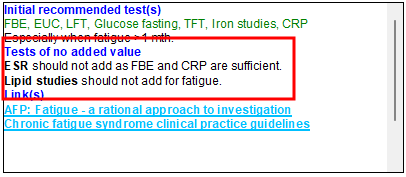
Based on analysis of a database of request data, GBR will indicate tests commonly ordered for a clinical context but do not add additional value, which may save the patient costs for unnecessary tests and increase test efficiency.
In the information box, tests are clearly marked with a Tests of no added value section.
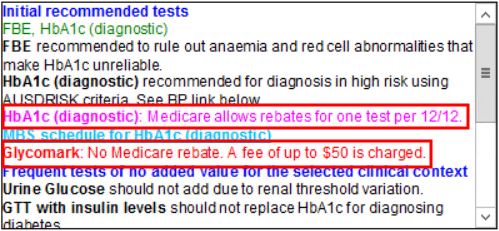
When a clinical context is selected, GBR will indicate any potential (pink) and actual (red) out of pocket costs associated with the recommended tests, based on the latest MBS and PBS schedules. This provides greater transparency on costs for the patient and does not require the GP to retain knowledge of or look up costs from a website outside of Bp Premier.
The Print Patient Collection Note function will print comprehensive preparation notes for a patient when applicable recommended tests are selected, such as fasting requirements for blood sugar tests. This reduces the chance of repeated testing due to inadequate preparation.
Frequently Asked Questions
Yes. GBR is enabled at the provider level, so if a provider wishes to continue using Favourites-based test ordering, they can leave the GBR option unselected and continue to use the current Pathology Request screen.
No. The requesting provider maintains control over the final request test list right up to printing the request.
GBR complements a provider's knowledge of the patient's medical history by:
- providing expert clinical guidelines, filtered by patient demographics
- suggesting tests that commonly return abnormal results, generated from analysis of test requests from peers matched to clinical context
- suggesting tests that provide no additional value, using the same analysis of request data.
GBR provides a complementary method of requesting to a doctor's Favourites list, which can become outdated if favourite tests are not regularly reviewed. But the doctor can also request from Favourites at any time.
The patient!
GBR presents an overall improved efficiency within healthcare for providers and pathology labs, but ultimately improved patient care, fewer needless tests, and great cost transparency for the patient are all outcomes.
Best Practice Software have a range of short instructional videos and in-depth How To articles on conducting guidance-based requesting from within Bp Premier. Select F1 or click Help > Online from inside Bp Premier to open the knowledge base and search for 'GBR'.
By using the same screen and workflow as 'regular' requesting, doctors don't have to learn a new workflow. The GBR version of the pathology request screen is designed to minimise typing information and instead use quick context shortcuts and selection lists to add existing information from the patient record.
A lack of shared clinical context between the requesting doctor and the pathology lab has been identified as a key obstacle in providing optimal patient care and efficient pathology testing.
The advice received from participating pathologists suggest that clinical notes from the provider are a highly valuable addition on request forms.
The options for adding information from the patient record and notes without retyping mean that adding clinical information does not add a procedural burden when creating request forms in Bp Premier.
Doctors are able to ignore or add to any recommended tests based on clinical context.
The Send feedback option provides information from doctors to ensure that GBR continues to both meet their requirements and introduce improvements and enhancements.
GBR is completely compatible with submitting electronic ordering requests to eOrdering-capable laboratories.
There is also an option to indicate that a request is generated from a telehealth consult, which will remove the option to print the request.
Information correct at time of publishing (19 February 2025).



 AU
AU 